
HECOF
Higher Education Classroom Of the Future
Important: Closing the VR-Exercise
Use the burger menu in the bottom-left corner and select the use the exit button on the right. Quitting the app in another way might cause issues. When a popup informs you that the app is already running, please reboot the PC.
Portal Hopper Installation/Update instructions
Step 1: Download Portal Hopper (here)
Step 2: Run installer
Step 3: Select any destination location *
Step 4: At first start, allow firewall access *
World Builder Installation/Update instructions
Step 1: Download World Builder (here)
Step 2: Run installer
Step 3: Select any destination location *
Step 4: At first start, allow firewall access *
* are only required for first install
Hopper Downloads
Changelog:
– Fixed controllers issue
Changelog:
– Fixed button clicking and slider dragging in Screen Mode
Changelog:
– Added support of hand interactions
Changelog:
– Fixed Telemetry Data
Changelog:
– Added fly-back of fallen down grabbed objects to original position
Changelog:
– Updated VR Telemetry Data collection
Changelog:
– Implemented VR Telemetry Data collection
Changelog:
– VR controller bugs fixed
Changelog:
– fixed location change not working
Changelog:
– updated to new Unity version
– added Knobs and Sliders
– added Point and Click Movement
Changelog:
– reworked rig
– switching of avatars
– 1st & 3rd person view interaction support
– bug fixing
Changelog:
– menu: added exit button
– start up time <2 sec
– desktop version: inital 3rd Person view fixed
– mouse locked in fixed
– F4: movement lock toggle integrated
Changelog:
– support for ProtocolHandler (exercise link)
– install/deinstall issue fixed
Changelog:
– fixed 1st & 3rd person positioning on loading
Frequently Asked Questions
Where do I find the locations for the NTUA demo?
NTUA Pilot – Evaluation 2 – Apparatus (needs Portal Hopper Version 0.2.7, 0.2.11 or 0.2.13a)
NTUA Pilot – Evaluation 2 – Guided Experiment (needs Portal Hopper Version 0.2.7, 0.2.11 or 0.2.13a)
NTUA Pilot – Evaluation 2 – Challenge Experiment (needs Portal Hopper Version 0.2.7, 0.2.11 or 0.2.13a)
NTUA Pilot – Evaluation 1 (needs Portal Hopper Version 0.144)
Where do I find the locations for the POLIMI demo?
POLIMI Pilot – Finalised – Apparatus (needs Portal Hopper Version 0.2.11 or 0.2.13a)
POLIMI Pilot – Finalised – Guided Experiment (needs Portal Hopper Version 0.2.11 or 0.2.13a)
POLIMI Pilot – Finalised – Challenge Experiment (needs Portal Hopper Version 0.2.11 or 0.2.13a)
POLIMI Pilot – Evaluation 2 – Apparatus (needs Portal Hopper Version 0.2.7)
POLIMI Pilot – Evaluation 2 – Guided Experiment (needs Portal Hopper Version 0.2.7)
POLIMI Pilot – Evaluation 2 – Challenge Experiment (needs Portal Hopper Version 0.2.7)
POLIMI Pilot -Evaluation 1 (needs Portal Hopper Version 0.144)
How do I exit the VR Lab (Hopper APP)?
Use the burger menu in the bottom-left corner and select the leave icon to exit the app.
When a popup informs you that the app is already running, please reboot the PC.
ALT+Tab: Switch to another application.
How do I switch between view modes?
F1: VR-View-Mode*
F2: 1st-Person-View-Mode
F3: 3rd-Person-View-Mode
* F1 without VR-Device: 3rd-Person-View-Mode.
How do I control my character?
Movement:
For small movements phyicaly move your body to the place for access beyond your savety zone you’ll need to teleport.
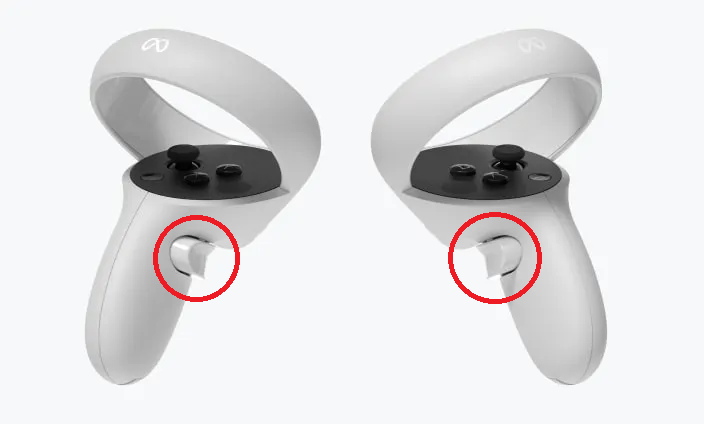
Grabbing:
For grabbing hold your hand insid the object you want to pick up. Press the “grab button” (middle finger) on the controller and you grab the object.
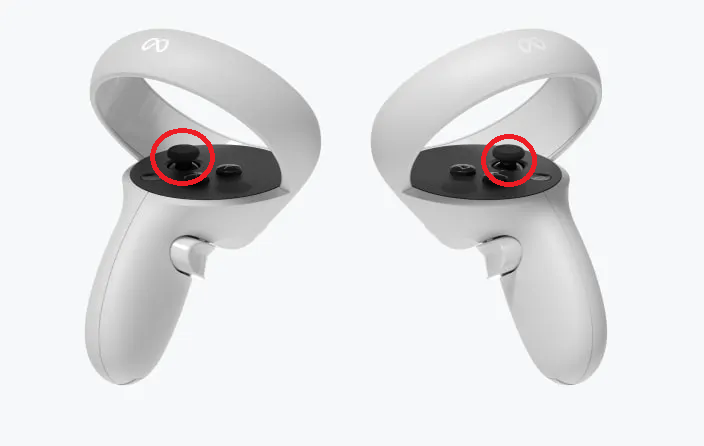
Teleporting:
For teleporting move one of the sticks forward and an ark will show the point of your destination. Uppon stick release you’ll be teleported to this point.
How do I control my character?
Movement:
Use arrow keys on your keyboard,
or
W: move forward
A: move left
S: move backward
D: move right
Look Direction:
Move your mouse to change the look direction of your character.
Camara distance:
Use scroll wheel to zoom in and zoom out.
Grabbing:
Not supported yet.

Project: 101086100 — HECOF — ERASMUS-EDU-2022-PI-FORWARD
Funded by the European Union. Views and opinions expressed are however those of the author(s) only and do not necessarily reflect those of the European Union or the European Education and Culture Executive Agency (EACEA). Neither the European Union nor EACEA can be held responsible for them.